

The OpenHPC integration conventions describe how components are packaged so that they work well together. They cover three areas: install paths, RPM package naming, and modulefiles. Please follow them when you add a new component or update an existing one.
Path Conventions
When practical, OpenHPC packages install into a consistent directory layout. Some packages do not support non-default install paths, so they are exceptions. The typical top-level installation path is:
/opt/ohpc
Predefined RPM macros organize installations below this path. They are defined in the components/OHPC_macros file. The subset below shows common macro names available to packagers:
%global PROJ_NAME ohpc
%global OHPC_HOME /opt/%{PROJ_NAME}
%global OHPC_ADMIN %{OHPC_HOME}/admin
%global OHPC_PUB %{OHPC_HOME}/pub
%global OHPC_APPS %{OHPC_PUB}/apps
%global OHPC_COMPILERS %{OHPC_PUB}/compiler
%global OHPC_LIBS %{OHPC_PUB}/libs
%global OHPC_MODULES %{OHPC_PUB}/modulefiles
%global OHPC_MODULEDEPS %{OHPC_PUB}/moduledeps
%global OHPC_MPI_STACKS %{OHPC_PUB}/mpi
%global OHPC_UTILS %{OHPC_PUB}/utils
The macro names are organized by function. There are separate macros for compilers, MPI toolchains, third-party libraries, and modulefiles.
Naming Conventions
The OpenHPC integration conventions also define a consistent RPM naming scheme for packages. To avoid conflicts with other package repositories, every OpenHPC package name ends with the suffix “-ohpc”. OpenHPC supports several compiler and MPI toolchains. So the same component is often built several times, and the RPM name shows which build it is.
The general convention is to add the compiler family name directly to the package name. Libraries that do not need MPI to build use the following RPM name:
package-<compiler family>-ohpc-<package version>-<release>.rpm
Packages that need MPI to build also include the MPI family name:
package-<compiler family>-<mpi family>-ohpc-<package version>-<release>.rpm
Module Conventions
To provide a flexible development environment, OpenHPC uses modules (either via Lmod or Environment Modules). Module files for relevant components are created as part of the build process.
Modules give you a convenient way to set standard environment variables in your shell, such as PATH and LD_LIBRARY_PATH. With them, you can access and compile against the provided software components. OpenHPC also uses the hierarchical capability of module tools to keep the development environment consistent.
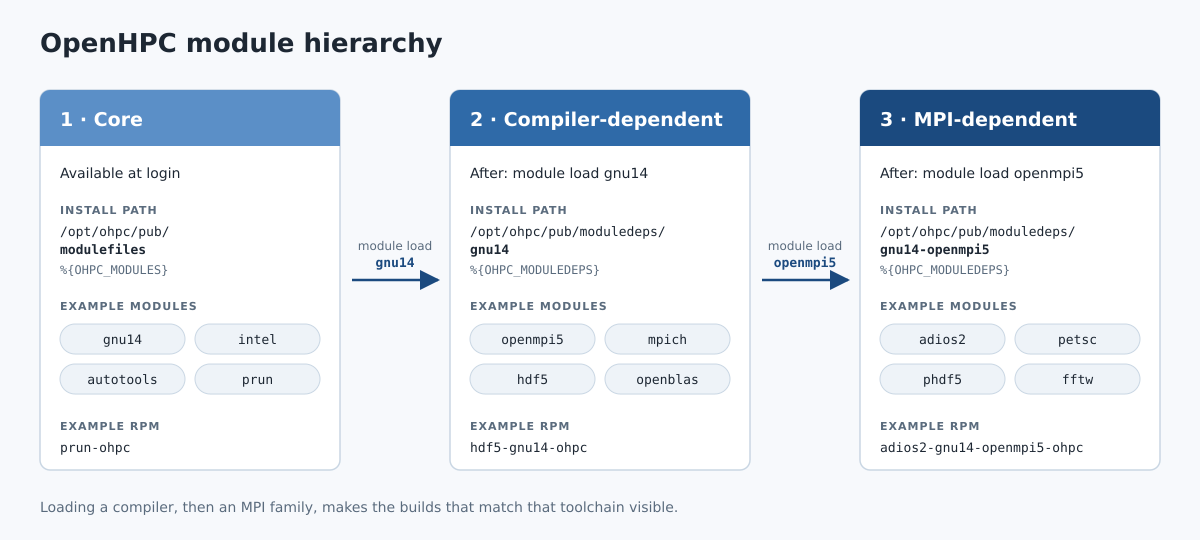
Beyond these common variables, the OpenHPC integration conventions add component-specific environment variables. They point to the top-level install path of a component and to its binaries, header files, libraries, and documentation. The example below shows the relevant modulefile commands from the .spec file of the Adios package.
%{__mkdir} -p %{buildroot}%{OHPC_MODULEDEPS}/%{compiler_family}-%{mpi_family}/%{pname}
%{__cat} << EOF > %{buildroot}%{OHPC_MODULEDEPS}/%{compiler_family}-%{mpi_family}/%{pname}/%{version}
...
setenv ADIOS_DIR %{install_path}
setenv ADIOS_DOC %{install_path}/docs
setenv ADIOS_BIN %{install_path}/bin
setenv ADIOS_LIB %{install_path}/lib
setenv ADIOS_INC %{install_path}/include
EOF
The %{} macros used above are defined earlier in the .spec file. See the Build Environment discussion for more on the %{compiler_family} and %{mpi_family} definitions.